
Web Automation for AI Agents: Playwright, Agent Browsers, and the Rise of WebMCP
Three ways AI agents use the web compared: Playwright DOM automation, visual browser agents, and the emerging MCP-inspired model for agent-native sites.

The web is in the middle of an architectural transition.
For the last two decades, software automation on the web mostly meant one thing: drive a browser, find DOM elements, and simulate user actions. That model still works. In fact, it powers a huge share of test automation, scraping, and browser-based workflows today.[1]
But AI agents are changing the shape of the problem.
Some agents now operate more like humans: they look at screenshots, reason over what is on the screen, and click or type accordingly.[2][3] At the same time, a third model is starting to come into view: websites exposing structured actions directly to agents, in the spirit of the Model Context Protocol.[4]
The short version:
Playwright is best when the workflow is known and reliability matters. Agent browsers are best when the interface is unfamiliar and adaptation matters. A WebMCP-style approach is most promising when a site is willing to expose stable, structured actions directly to agents.
This gives us three distinct models of web interaction:
- Browser automation frameworks such as Playwright
- Agent browsers that use vision and reasoning
- Agent-native web interfaces that expose structured tools to agents
Each model sits at a different abstraction level. And each is good at a different class of work.
The Three Models of Web Interaction
| Approach | How the agent interacts | Primary abstraction | Best fit |
|---|---|---|---|
| Browser automation | DOM selectors and scripted steps | HTML structure | Deterministic workflows |
| Agent browser | Screenshots, vision, reasoning, mouse/keyboard actions | Visual interface | Unfamiliar or changing workflows |
| Agent-native web | Structured tool calls exposed by the site | Intent-level actions | Cooperative, agent-ready systems |
One useful way to think about these three models is that they differ not just in implementation, but in what the agent is actually manipulating:
- Playwright manipulates the page structure.
- Agent browsers manipulate the visual interface.
- A WebMCP-style system would manipulate the site's intent surface.
That shift matters because the closer you get to intent, the less brittle the interaction becomes.
1. Browser Automation: Playwright as the Deterministic Baseline
Playwright is the modern version of classic browser automation: programmatic control over real browsers, with strong tooling around selectors, waiting, tracing, isolation, and multi-browser execution.[1]
At a high level, the model looks like this:
Example:
await page.click("#login")
await page.fill("#email", "user@email.com")
await page.fill("#password", "secret")
await page.click("#submit")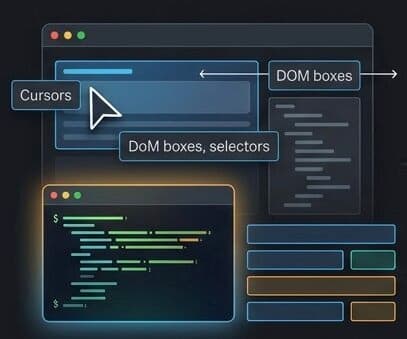 Deterministic browser automation
This is not an AI system trying to infer intent. It is a program executing an explicit plan against explicit page structure.
Why Playwright Works So Well
The biggest advantage is determinism.
If the page contains a stable selector and the workflow is well understood, Playwright is hard to beat. It supports Chromium, Firefox, and WebKit, and exposes one API across JavaScript, TypeScript, Python, Java, and .NET.[1]
That makes it a strong fit for:
- End-to-end test automation
- Regression suites in CI/CD
- Scraping known sites
- Browser-based RPA on stable internal tools
- Repeated workflows with clearly defined steps
Why teams keep reaching for Playwright:
It does not require the website to cooperate. If a browser can render the page and your script can target the right elements, the automation can run.
Where Playwright Breaks Down
Its strength is also its weakness.
Playwright depends on page structure. If a redesign changes #checkout-button to .primary-cta, or moves an interaction into a shadowed component tree, your script can fail even though the human-visible workflow is still the same.
That brittleness is manageable for known systems, but it becomes expensive when workflows vary across sites.
In other words:
- Playwright is excellent at doing the same thing repeatedly.
- It is much worse at discovering what to do next in an unfamiliar interface.
The practical limitation:
Playwright understands structure, not meaning. It can click a selector. It cannot, by itself, infer that the right button is the one that visually looks like the checkout action after a redesign.
2. Agent Browsers: Vision and Reasoning on Top of the Web
Agent browsers take a very different approach.
Instead of binding to DOM selectors, they observe the interface as pixels, reason about what appears to be on screen, and then act using the same primitives available to a human: move the cursor, click, type, scroll.[2][3]
OpenAI's Operator describes this directly: the system sees screenshots and interacts with web pages using mouse-and-keyboard style actions, without requiring custom API integrations.[2] Anthropic's computer-use capability makes the same move: rather than exposing one bespoke tool per website, it teaches the model general computer skills over ordinary interfaces.[3]
The architecture looks more like this:
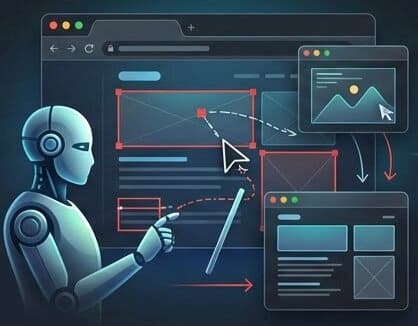 Agent browser mode
That shift changes what the system is good at.
Why Agent Browsers Are Powerful
The biggest advantage is flexibility under uncertainty.
An agent browser can approach an unfamiliar page and still make progress:
- A popup appears unexpectedly, so it closes the popup.
- The login button is not where it was yesterday, so it searches visually for the likely action.
- A flow spans multiple websites, so it navigates between them without a hand-authored script for every possible branch.
This is why the model is compelling for:
- Travel planning
- Product comparison across multiple sites
- Personal web assistants
- Open-ended research workflows
- Broad automation where the page structure is unknown in advance
What agent browsers really buy you:
They trade precision for adaptability. You stop writing every branch by hand, and instead let the model infer the next action from what it sees.
Where Agent Browsers Break Down
The cost of that flexibility is easy to underestimate.
Each step often requires a loop like this:
- Capture the current screen
- Interpret the interface
- Decide what to do
- Execute the action
- Observe the result and repeat
That makes agent browsers slower and more expensive than selector-based automation. It also makes them less deterministic. The model can confuse nearby affordances, misread ambiguous interfaces, or pick a plausible-but-wrong action.
OpenAI explicitly frames Operator as a research preview with limitations.[2] Anthropic describes computer use as experimental, imperfect, and better suited to low-risk tasks while the capability matures.[3]
So the right mental model is not "agent browsers replace Playwright." It is:
- Use Playwright when the workflow is known.
- Use agent browsers when the workflow is discoverable but not predefined.
3. WebMCP: The Agent-Native Direction
The third model is the most interesting conceptually, and the least mature operationally.
The basic idea is simple: instead of forcing an agent to operate a site through the UI, let the site expose structured actions directly to the agent.
The inspiration here is MCP. The Model Context Protocol is an open standard for connecting AI applications to external systems, including data sources, tools, and workflows.[4] In the MCP model, an AI system does not need to reverse-engineer every interface. It can call well-defined capabilities.
Applied to the web, that suggests an agent-native interaction model that looks like this:
So instead of doing this:
click origin field
type DEL
click destination field
type BLR
open date picker
select 10 April 2026
click search
The agent could do something closer to this:
await airline.book_flight({
origin: "DEL",
destination: "BLR",
date: "2026-04-10",
});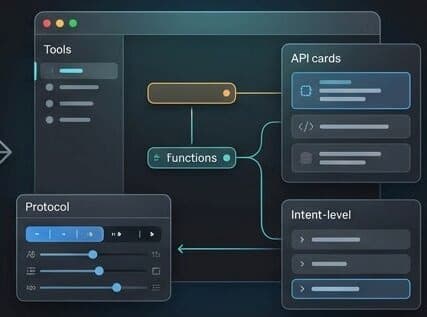 Agent-native web interaction
Why This Model Is So Attractive
If such a layer exists, it solves several hard problems at once.
First, it is stable across UI redesigns. The site's visual design can change without breaking the agent interface.
Second, it is more reliable. Structured parameters are easier to validate than pixel interpretations or DOM selector chains.
Third, it is faster. A direct action call removes the screenshot-reasoning loop and much of the UI choreography.
Fourth, it gives websites a clearer place to attach permissions, authentication, rate limits, and policy checks.
Why people are excited about this direction:
A WebMCP-style layer turns a website from something an agent must operate indirectly into something the agent can collaborate with directly.
Why It Is Still Early
This is where caution matters.
WebMCP is best understood today as an emerging design direction, not a universally deployed standard. The idea is compelling, but large-scale adoption would require sites, browsers, standards groups, and agent platforms to align on schemas, permissions, trust, and safety boundaries.
That means the limitations are structural, not incidental:
- Most websites do not expose agent-native actions today.
- Legacy sites will continue to need UI-level automation.
- Permission models for agent access are still evolving.
- The ecosystem vocabulary is ahead of the production reality.
Important caveat:
WebMCP should be read here as a useful architectural idea: a browser-facing, MCP-inspired way for sites to expose stable actions to agents. It is not yet a broadly adopted replacement for today's web automation stack.
A Side-by-Side Comparison
| Feature | Playwright | Agent Browsers | WebMCP-style interfaces |
|---|---|---|---|
| Interaction model | DOM selectors and scripts | Vision plus reasoning | Structured actions |
| Speed | Fast | Slowest of the three | Potentially fastest |
| Determinism | High | Lower | High, if the schema is stable |
| Works on existing websites | Yes | Yes | Only where supported |
| Requires site cooperation | No | No | Yes |
| Robust to redesigns | Medium to low | Medium | High |
| Intelligence required at runtime | Minimal | High | Low to medium |
The important point is that these are not three versions of the same tool. They are three answers to three different questions:
- How do I automate a known browser workflow reliably?
- How do I navigate an unknown interface adaptively?
- How do I let agents interact with my service without pretending to be a human user?
Example: Booking a Flight in Three Different Worlds
Let us make the comparison concrete.
Playwright
With Playwright, you would author the flow explicitly:
- Open the airline site
- Fill origin and destination
- Choose a date
- Click search
- Select a flight
- Continue to checkout
This is excellent if the workflow is fixed and the interface is known.
Agent Browser
With an agent browser, the instructions can stay high level:
- Find the flight search form
- Enter the route and date
- Compare the results
- Pick the cheapest acceptable flight
- Ask for confirmation before purchase
This is excellent if the site, layout, or path may vary.
WebMCP-style Interface
With an agent-native surface, the interaction becomes intent-level:
await travel.search_flights({
  origin: "DEL",
  destination: "BLR",
  date: "2026-04-10",
  cabin: "economy",
});

await travel.reserve_flight({
  flight_id: "6E-512",
  traveler_id: "primary-user",
});
This is excellent if the travel service intentionally exposes stable actions for agents.
A Useful Mental Model
There is a simple analogy that makes the difference clear:
| Approach | Analogy |
|---|---|
| Playwright | A robot using a mouse and keyboard by following an exact script |
| Agent browser | A robot watching the screen and deciding what to do next |
| WebMCP-style web | A robot using a control panel designed for machine operators |
This is also a useful way to think about the future stack:
- Playwright-like tools remain the workhorse for deterministic automation.
- Agent browsers bridge the messy, legacy web.
- Agent-native surfaces are where the ecosystem can become dramatically more reliable.
The Real Future Is Layered, Not Singular
The easiest mistake in this conversation is to ask which of these models will win.
That is probably the wrong question.
The web is too large, too messy, and too economically uneven to converge quickly on a single mode of interaction. A more realistic future looks layered:
In that layered future:
- Agent browsers handle legacy or unpredictable interfaces.
- Playwright handles deterministic browser tasks and test automation.
- WebMCP-style designs gradually emerge where businesses want agent traffic to be fast, reliable, policy-aware, and machine-readable.
The deeper shift:
The long-term transition is not from browsers to no browsers. It is from UI-first interaction toward intent-first interaction, with browser automation filling the gap for everything that has not yet been redesigned for agents.
That is why all three models matter at the same time.
Playwright is not obsolete. Agent browsers are not just a fancier testing tool. And WebMCP is not a present-day replacement for the open web.
They are three layers in the emerging stack of the agentic web.
References
[1]: Playwright Documentation - playwright.dev
[2]: OpenAI, Introducing Operator - openai.com/index/introducing-operator
[3]: Anthropic, Introducing computer use, a new Claude 3.5 Sonnet, and Claude 3.5 Haiku - anthropic.com/news/3-5-models-and-computer-use
[4]: Model Context Protocol, What is the Model Context Protocol (MCP)? - modelcontextprotocol.io/introduction